Jenni AI, explained by someone who actually tested it
Independent, hands-on guides to Jenni AI, the AI writing tool for essays, research papers and literature reviews. Real screenshots from a real account, real test numbers, and the limits other sites skip.
New to Jenni? See how it works ↓
Free plan · no card needed · jenniaiblog.com is an independent guide site, not Jenni’s official website. Buttons are affiliate links (disclosure).
Who Jenni AI is for
Students writing essays
Plan, draft and cite an essay without staring at a blank page.
Researchers
Turn a question into a cited literature review, then check every source.
What is Jenni AI?
Jenni AI is an AI writing assistant built for academic work: essays, research papers, literature reviews and theses. It works inside its own document editor, so you write and it suggests the next sentence as you go.
Unlike a general chatbot, Jenni adds in-text citations to real papers while it writes. It can also read the PDFs you upload and write from your own sources.
You stay in charge of every sentence. You accept a suggestion, reject it, or ask Jenni to rewrite it.
What Jenni AI can do
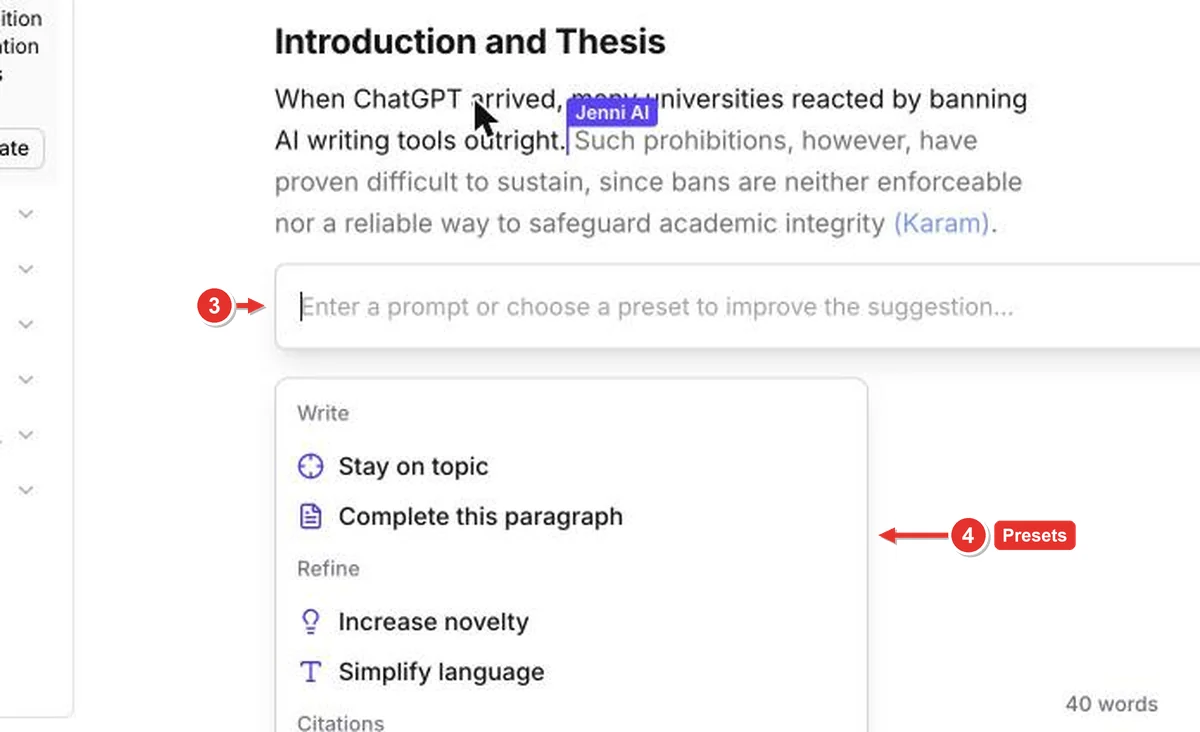
AI Autocomplete
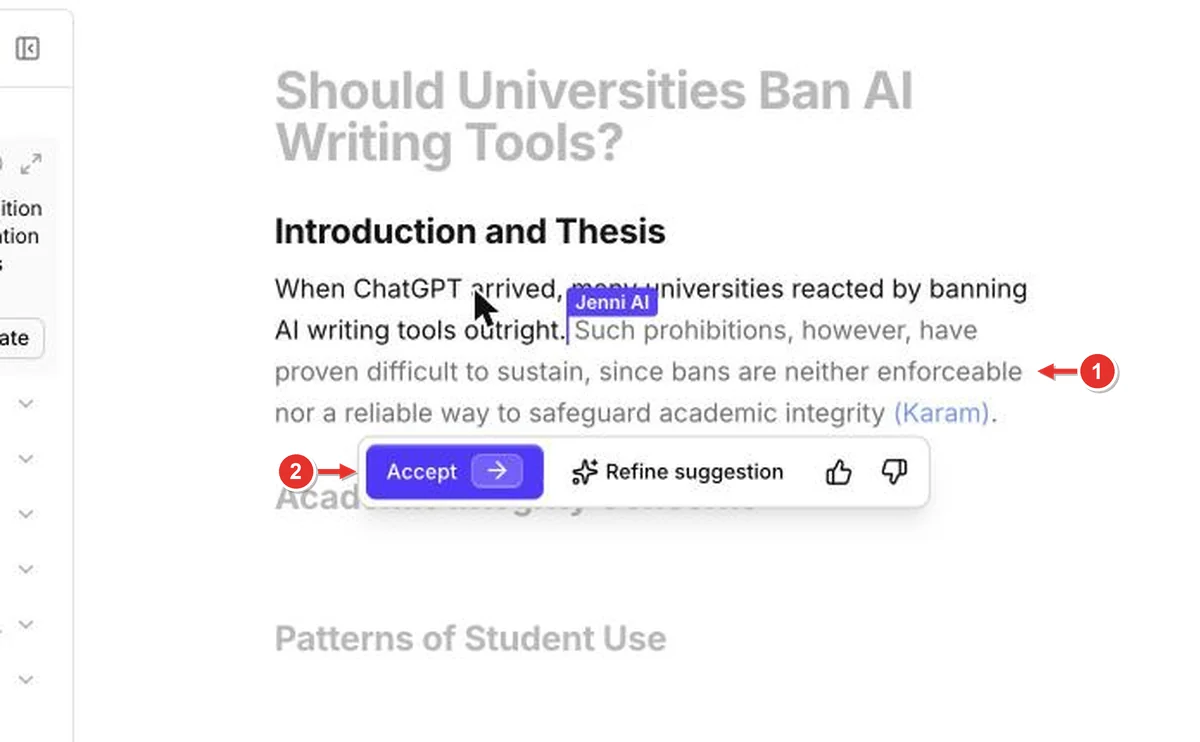
Suggests the next sentence in grey. Press → to keep it, or keep typing.
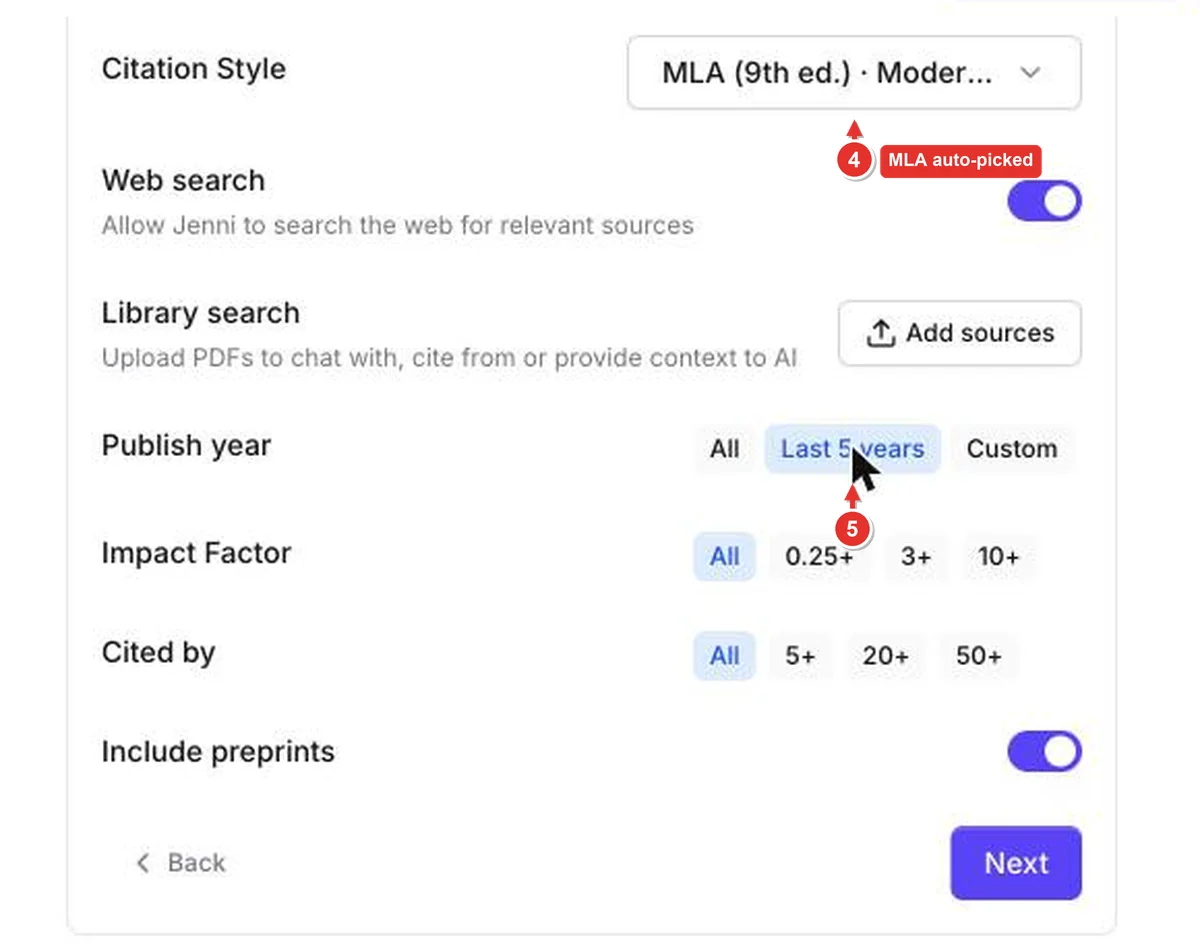
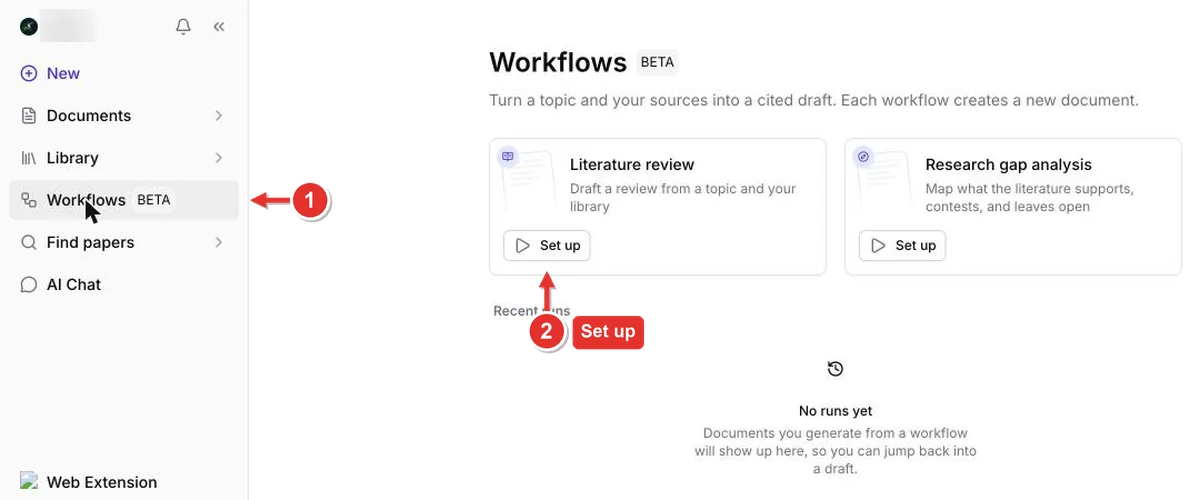
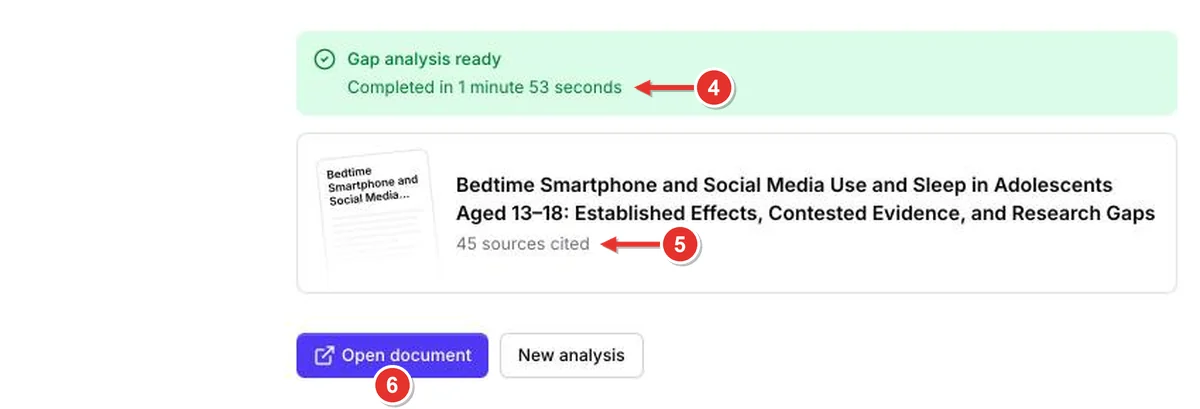
Workflows
Ready-made flows such as Literature review and Research gap analysis.
Chat with your PDFs
Upload papers to your Library and ask questions about them in AI Chat.
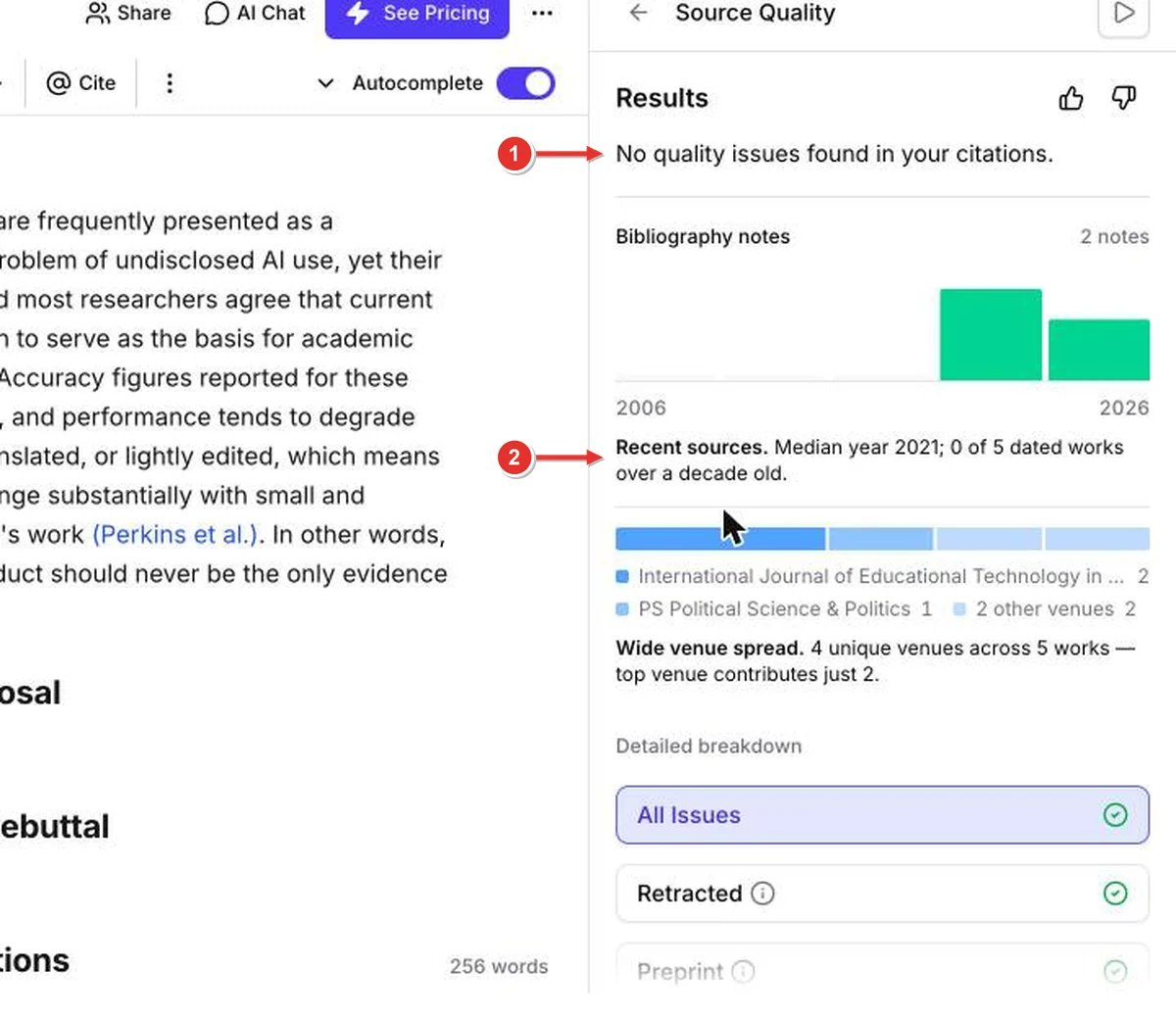
Review your draft
Five review types: Claim confidence, Peer review, Source quality, Tone of voice and Proofread.
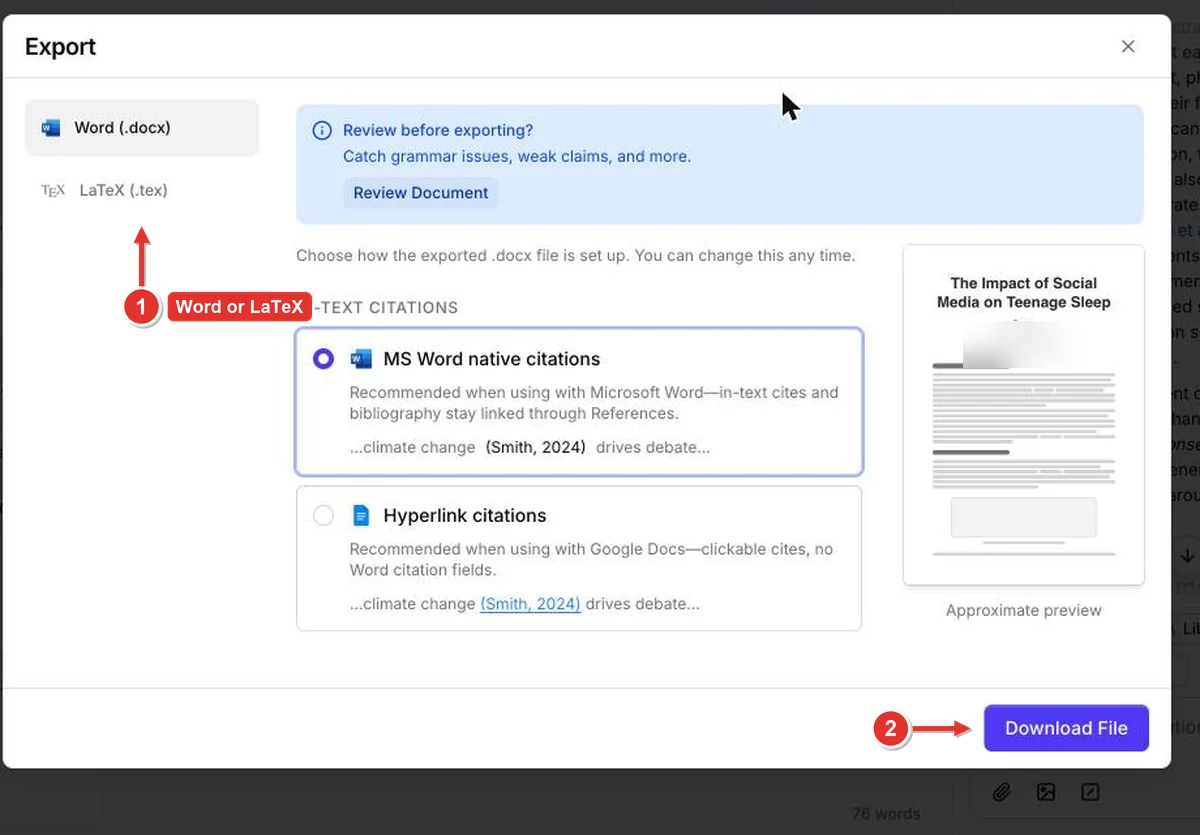
Export to Word or LaTeX
Download your paper as .docx or LaTeX when you are done.
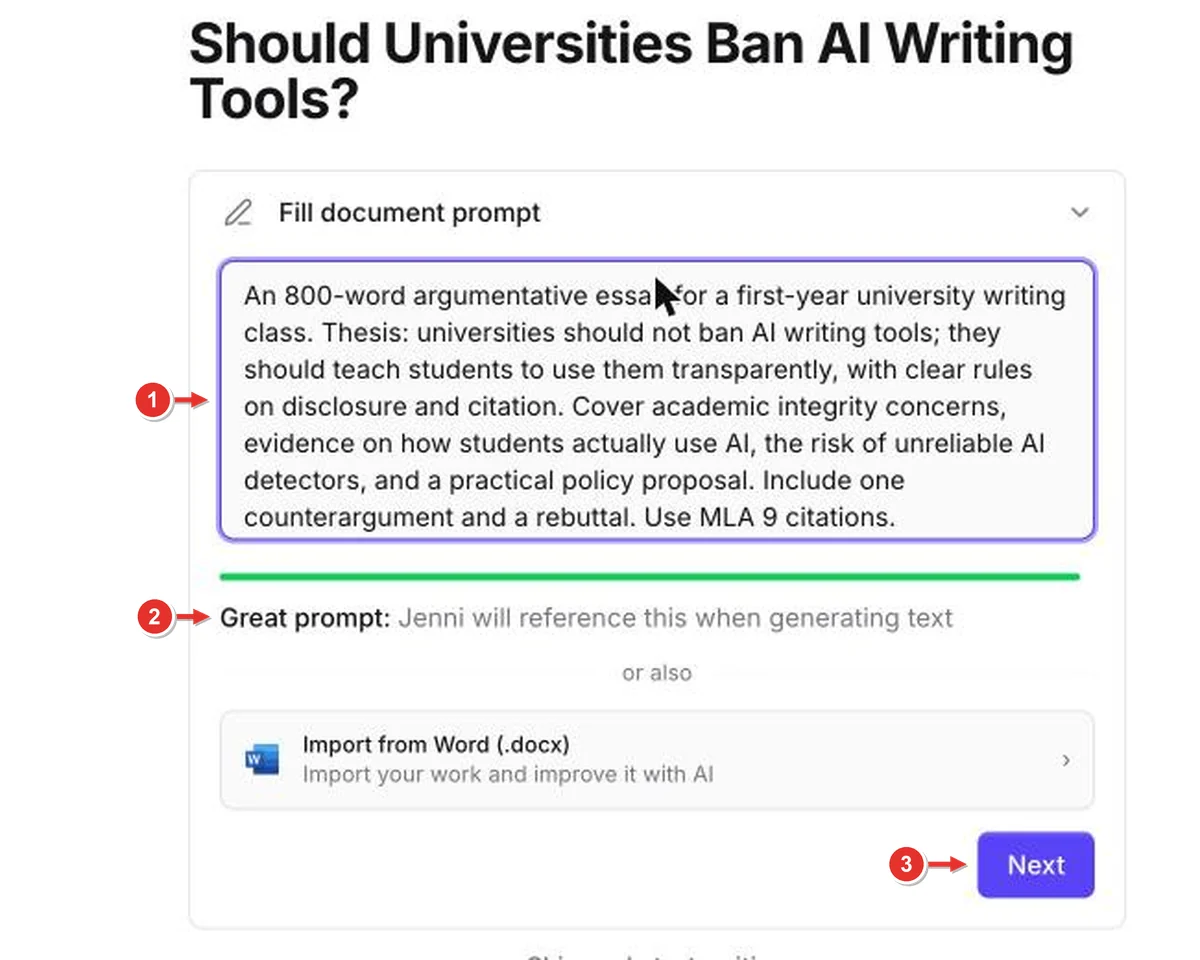
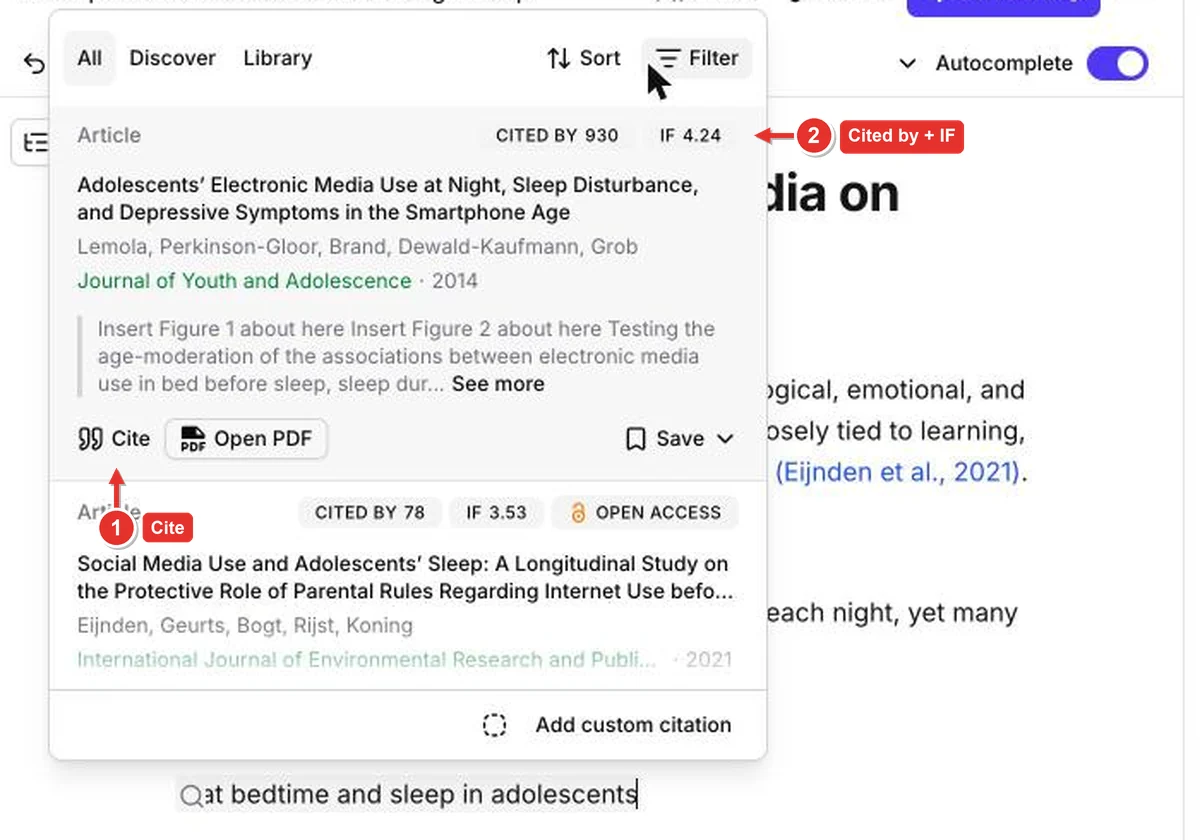
How Jenni AI works in 3 steps
These are our own screenshots from a free account. The red arrows show where to click.
Our Jenni AI test results
We tested Jenni AI on a free account in November 2026, on real assignments. Here is what came out.
| Test | What we found | Full test |
|---|---|---|
| Citation accuracy | 10 of 10 citations were real papers; 8 had every detail right | Citations |
| Literature review workflow | 2,592 words and 49 sources in 1 min 50 s | Literature review |
| 800-word essay | Jenni wrote 76% of the words; 3 of 5 citations fit their sentence closely | Essay case study |
| Same question in rival tools | Elicit about 1,360 words, Consensus about 760, SciSpace 335 | Generators compared |
| Free plan limits | 10 autocompletes a day, 5 AI requests, reference list locked | Is Jenni AI free? |
Honest limit: 2 of 5 essay citations were loose matches for their sentence. Always open the source before you keep it.
Jenni AI pros and cons
✓ Pros
- Writes with you inside a real editor, not a chat window
- Citations point to real, searchable papers
- Writes from your own PDFs and library
- Free plan with no card, and autocomplete resets daily
✗ Cons
- Only 5 AI requests on the free plan, and they don’t reset daily
- The reference list (bibliography) is a paid feature
- Some citations are loose matches, so you must check them
- No official mobile app; it works in a mobile browser
What’s free, and when Plus makes sense
Free · $0
- 10 autocompletes a day
- 5 AI requests (Chat, Edit, Ask Jenni)
- 10 PDF uploads
- 3 reviews and 3 workflow runs
- Unlimited in-text citations
No card needed. Good for trying Jenni on a real assignment.
Plus · $12/mo billed yearly ($30 monthly)
- 500 AI requests a month instead of 5
- The full reference list (bibliography)
- Higher limits on the tools the free plan caps
Worth it if you write most days or need the reference list. Pro is $29/mo yearly for heavy research use.
Compare Free, Plus and Pro in detail → · What resets on the free plan →
Jenni AI vs alternatives
Jenni is a writing tool first. Research search tools find and summarize papers, but they don’t help you draft a full paper.
| Tool | Best for | Price |
|---|---|---|
| Jenni AI | Drafting papers with citations, in an editor | Free plan; Plus $12/mo yearly |
| Elicit | Screening studies and extracting data | Free plan with limits |
| Consensus | Quick yes/no answers from research papers | Free plan with limits |
| SciSpace | Reading and explaining papers | Free plan with limits |
| Paperpal | Editing and polishing an existing draft | Jenni vs Paperpal |
5 tips to get better results from Jenni AI
- Write a detailed first prompt. Give the topic, length, audience and citation style; Jenni picks the style from your prompt.
- Upload your PDFs first. Jenni then cites and writes from sources you already trust.
- Accept small pieces. Press → for a sentence, or Option + → (Mac) to take one word at a time.
- Open every citation. Check that the paper really says what your sentence claims.
- Save AI requests for big jobs. On the free plan, use autocomplete (10 a day) for drafting and keep the 5 AI requests for chat and edits.
All our Jenni AI guides
How we test Jenni AI
Every guide on this site is written from our own Jenni account. We take real screenshots and mark them up with arrows and numbers that match the steps.
Prices and plan limits are checked on jenni.ai/pricing and dated. When something is paid-only, we say so.
We earn a commission if you upgrade through our links. That never changes what we report, including the limits.
Jenni AI FAQ
Is Jenni AI free?
Yes. The free plan gives 10 autocompletes a day, 5 AI requests, 10 PDF uploads and unlimited in-text citations, with no card needed. The full reference list is a paid feature.
Is Jenni AI legit?
Yes. It is a real writing tool, and in our tests 10 of 10 citations pointed to real papers. You still need to open each source and check it fits your sentence.
Is this the official Jenni AI website?
No. The official site is jenni.ai. jenniaiblog.com is an independent guide site, and our buttons are affiliate links.
Does Jenni AI plagiarize?
Jenni writes new sentences and says it aims for plagiarism-free text. AI detectors may still flag AI writing, so edit it into your own voice and cite your sources.
Can Jenni AI write a whole essay for me?
It can draft most of it, but you steer it. In our 800-word essay test Jenni wrote 76% of the words while we chose the outline and checked every citation.
Does Jenni AI work on a phone?
Yes, in a mobile browser. We found no official app, and Jenni recommends a desktop for longer writing.
Will Turnitin detect Jenni AI?
It may. AI detectors can flag AI-written text, so rewrite in your own words, add your own analysis and follow your school’s AI policy.
How do I cancel Jenni AI?
Go to Settings, then Account, then Subscription. Our cancel guide shows each step, and refunds can be requested within 7 days.
Which Jenni AI plan is best?
Start on Free. Move to Plus ($12/mo billed yearly) if you write most days or need the reference list. See the plan comparison.
Start Jenni free in 3 steps
- Sign up with Google or email.
- Describe your paper in the prompt box: topic, length and citation style.
- Press → to accept a suggestion, or keep typing to skip it.
No card needed. Upgrade only if you hit the free limits.