Quick answer: how do you use Jenni AI for a thesis?
Write one Jenni document per chapter. Give each a detailed chapter prompt, filter sources (for example, papers cited 20+ times), let Jenni build the outline, then write with autocomplete and Generate. Use Workflows for the literature review and research gaps, Version history and Share to work with your supervisor, and write your research questions and conclusions yourself.
You can test this whole workflow on Jenni AI’s free plan.
Is Jenni AI right for you?
✓ Great for
- Essays and research papers that need real citations
- Literature reviews and thesis chapters
- Writing from your own PDFs and sources
- Staying in control, one sentence at a time
✗ Not the right tool for
- Getting a finished essay in one click
- Grammar-only checking (a grammar tool is cheaper)
- Anyone who won’t check the sources it adds
A thesis is too long to write in one AI prompt. The trick is to use Jenni chapter by chapter, with the right settings for each part.
We set up a real master’s thesis chapter in Jenni on November 23, 2026, on a free account. Every step below has a screenshot, plus a free chapter template you can download.
In this guide
- Plan: one document per chapter
- Step 1: Write a chapter prompt
- Step 2: Filter for strong sources
- Step 3: Get the chapter outline
- Step 4: Choose sources per section
- Step 5: Generate, then write key parts yourself
- Chapter 2: the literature review
- Find research gaps with a workflow
- Chapters 3–6: what to use Jenni for
- Work with your supervisor
- Free thesis chapter template
- Free plan and thesis limits
- What didn’t work
- FAQ
Plan: one document per chapter
Jenni works best on documents of a few thousand words. Create a separate document for each chapter: Introduction, Literature Review, Methodology, Results, Discussion and Conclusion.
Jenni’s own thesis page uses the same six chapters, with typical lengths from about 1,000 words (Conclusion) to 4,000+ (Literature Review).
Step 1: Write a chapter prompt
Click New → Create new document, give it the chapter title, and describe the chapter in the prompt box: degree, field, length, topic, what to cover and the citation style.
Chapter 1 (Introduction) of a master’s thesis in public health, about 2,000 words. Topic: how smartphone and social media use at bedtime affects sleep quality and duration in adolescents aged 13-18. Cover the background and why adolescent sleep matters, the problem statement, the research gap, the aim and three research questions, the significance of the study, and a short outline of the thesis chapters. Formal academic tone, APA 7 citations.
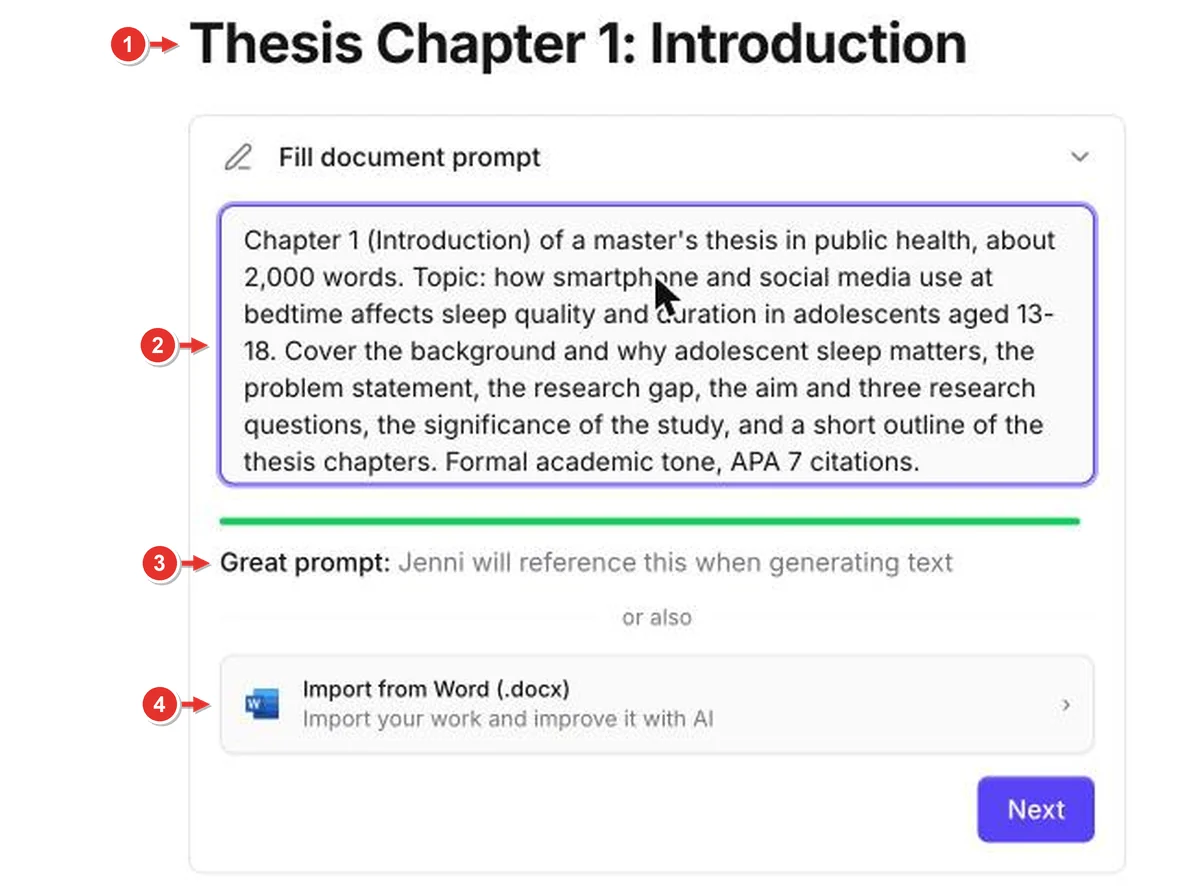
Already have a draft? Use Import from Word (.docx).
Jenni says it keeps your formatting and citations.
What you get free
Jenni AI’s free plan, checked on jenni.ai/pricing in November 2026:
- 10 autocompletes a day (resets daily)
- 5 AI requests, shared by AI Chat, AI Edit and Ask Jenni
- 10 PDF uploads to write from your own sources
- 3 reviews and 3 workflow runs
- Unlimited in-text citations (the reference list is a paid feature)
No card needed · free forever. If you outgrow it, Plus is $12/mo billed yearly.
Step 2: Filter for strong sources
In citation preferences, pick your style and use the filters. For a thesis we set Cited by 20+ so Jenni favours established papers.
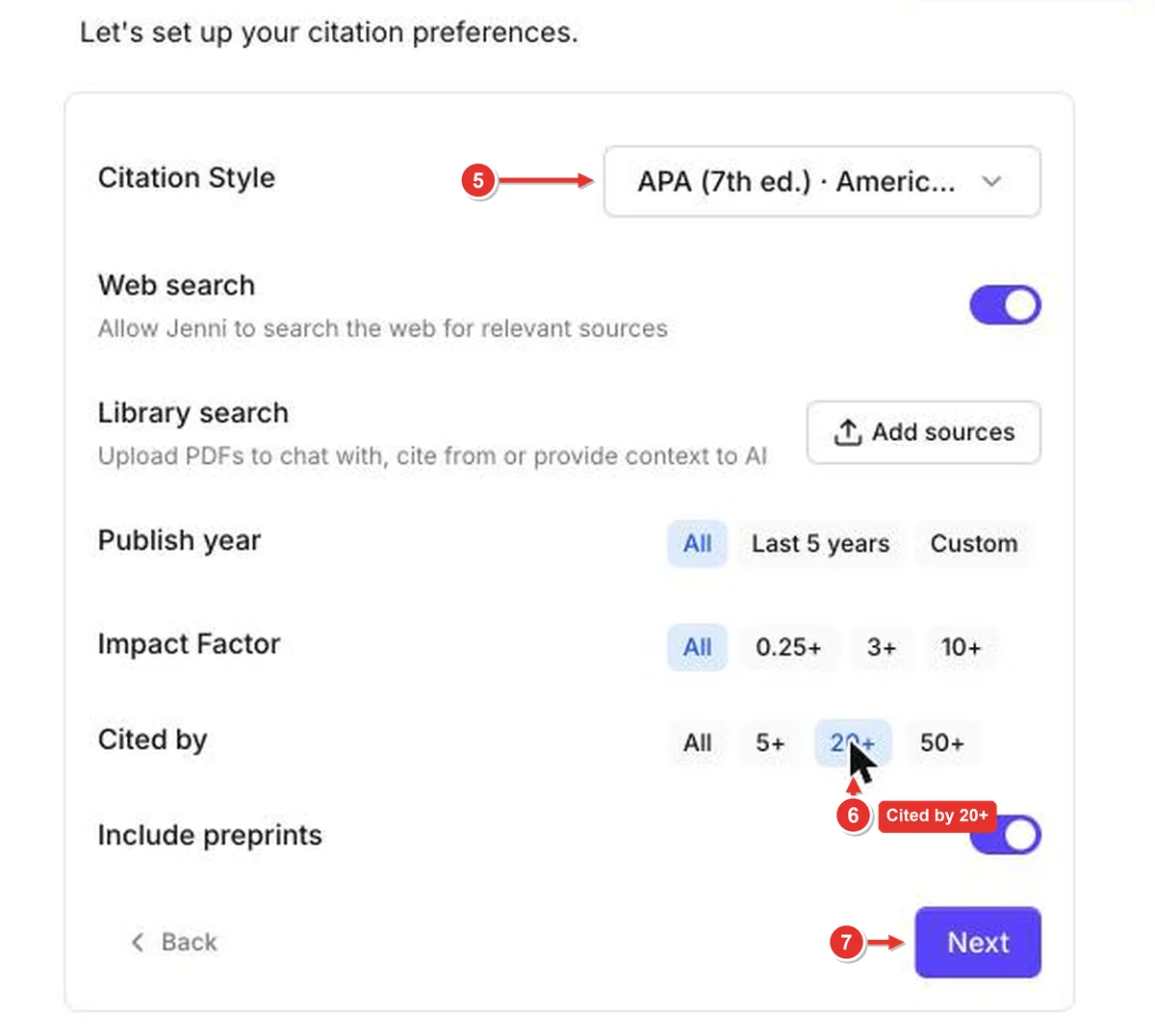
You can also filter by publish year and impact factor, and switch preprints off if your department doesn’t accept them.
Step 3: Get the chapter outline
Choose Smart headings and click Start Writing. For our introduction, Jenni built a textbook thesis structure: Background, Problem Statement, Research Gap, Aim and Research Questions (with Research Aim and Research Questions), Study Significance and Thesis Structure.
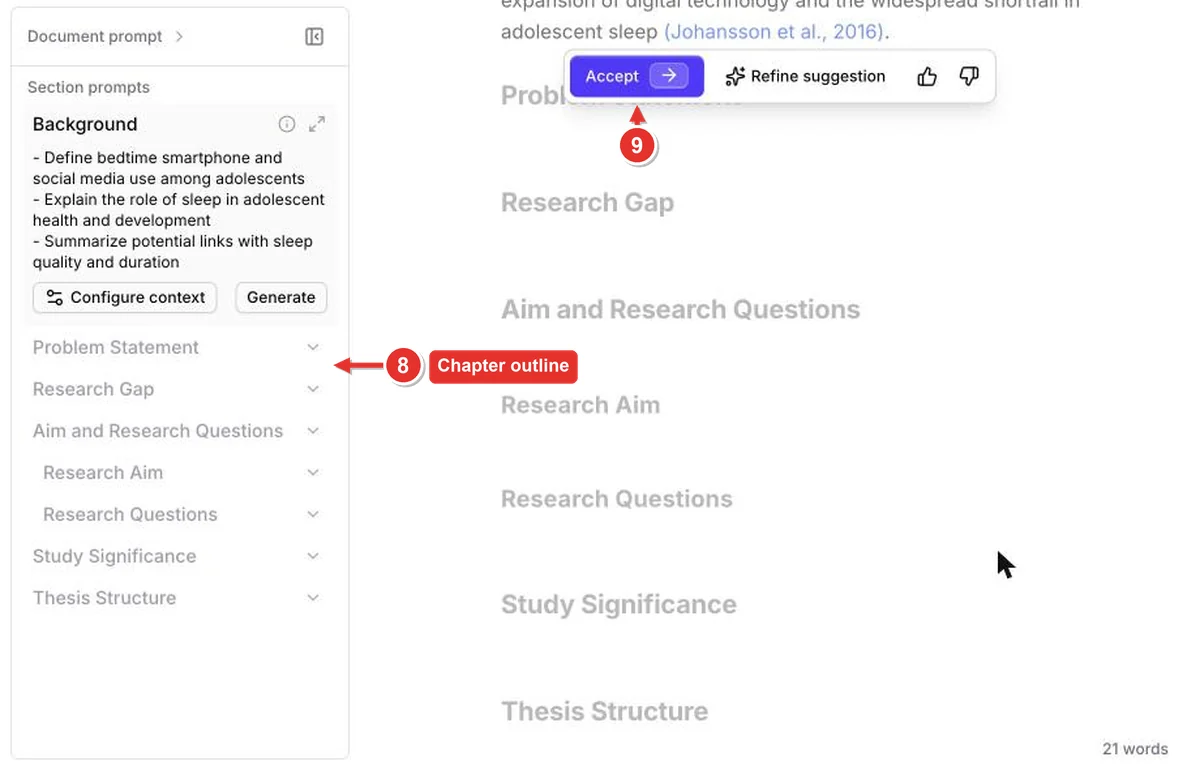
Edit any section prompt to match your supervisor’s expectations before you write.
Step 4: Choose sources per section
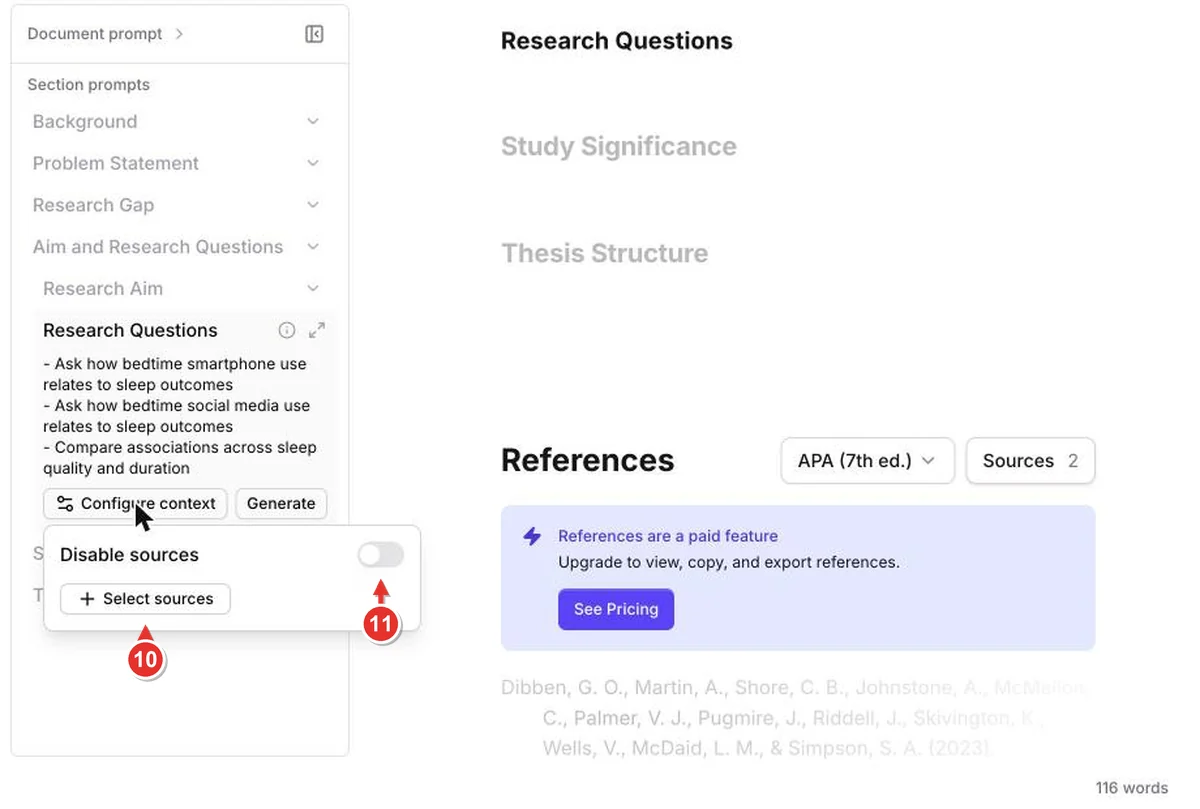
Under each section prompt, click Configure context. Select sources limits that section to papers you choose, which is ideal once your Library holds your key PDFs.
For sections that shouldn’t cite anything, such as your research questions, turn on Disable sources.
Step 5: Generate, then write key parts yourself
Click Generate under a section prompt to draft its opening, then accept or refine the suggestion.
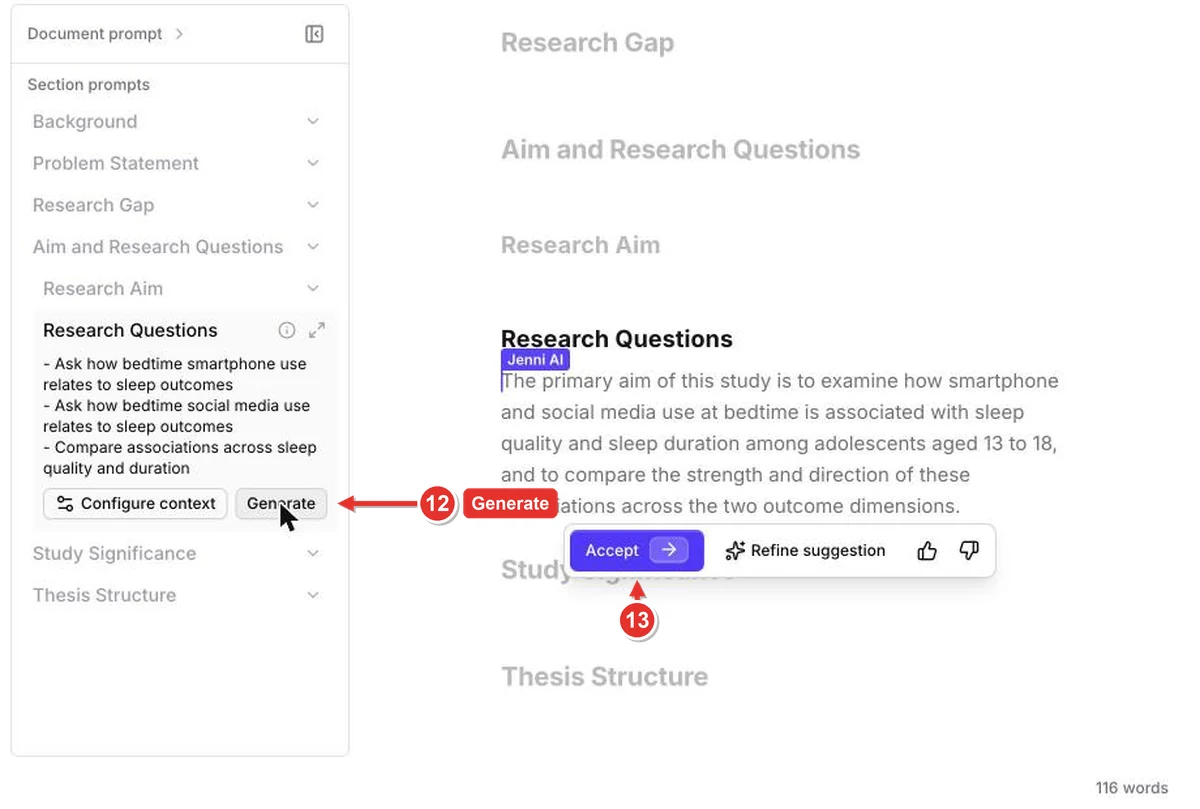
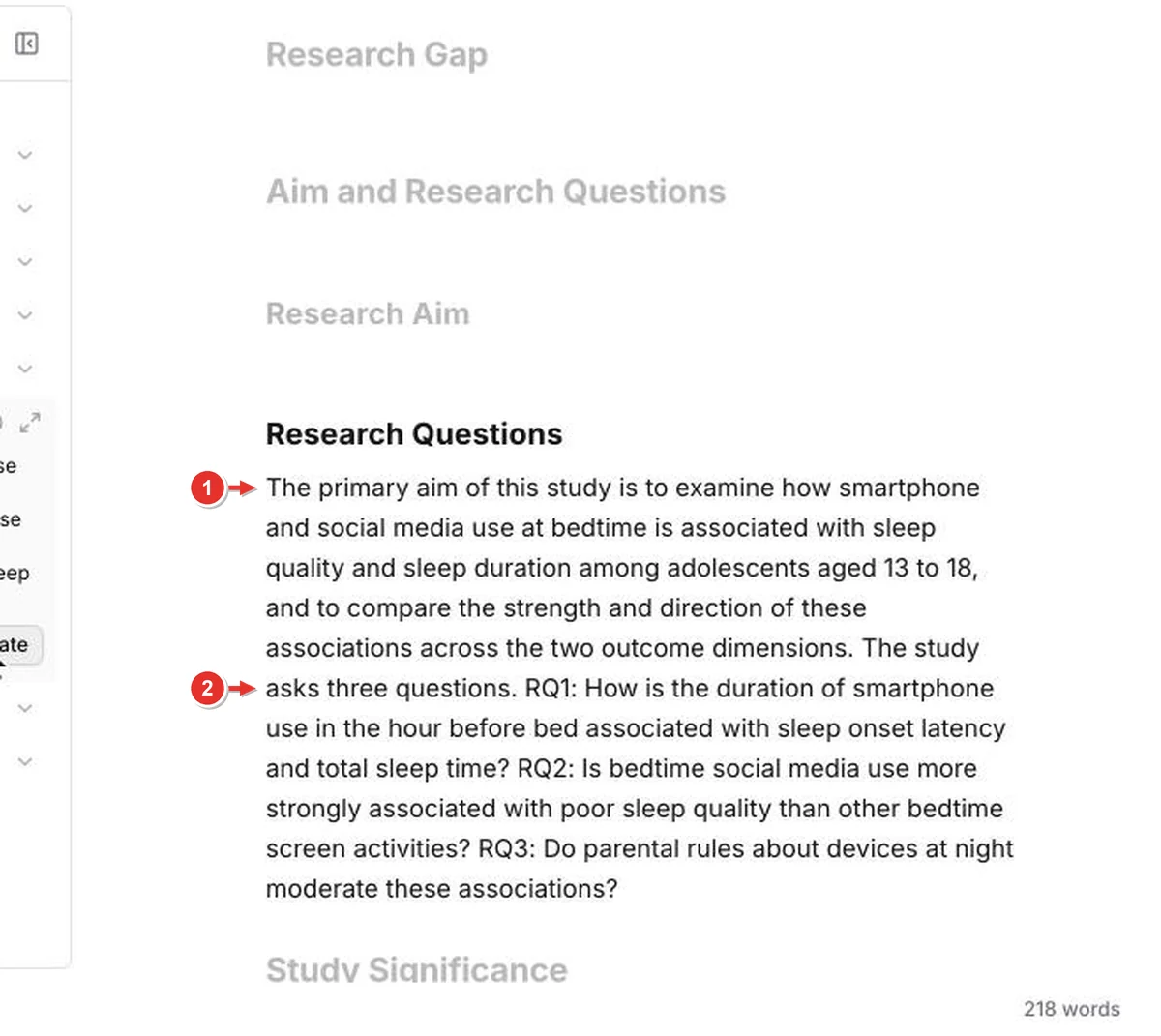
We let Jenni draft the aim, then typed the three research questions ourselves. Your research questions define your thesis, so they should be your own words.
Learn the autocomplete shortcuts in our autocomplete guide.
Chapter 2: the literature review
For the literature review chapter, use Workflows → Literature review. It drafts a themed review from your topic and your Library.
Our test produced 2,592 words with 49 sources.
Full walkthrough: Jenni AI literature review. Comparing tools? See the best free AI literature review generators.
Find research gaps with a workflow
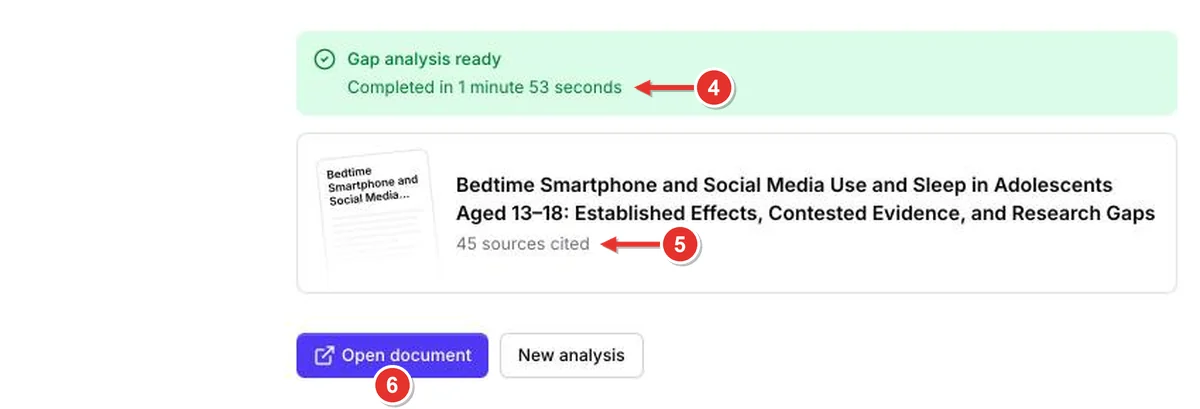
Jenni’s second workflow, Research gap analysis, is made for theses. It sorts what the literature says into well-supported, contested and under-explored claims, and suggests a direction for each opening.
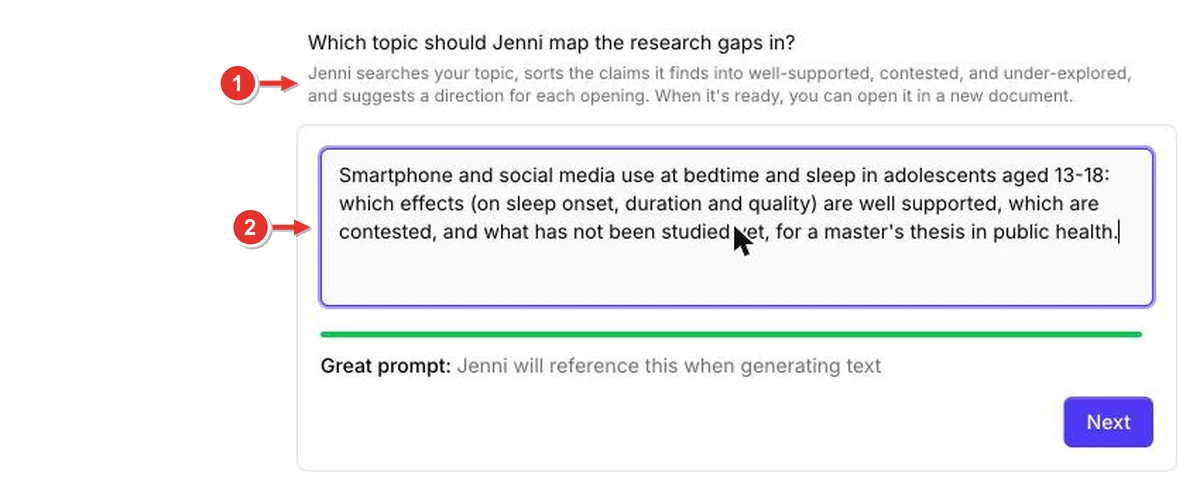
It runs in three steps: searching, extracting claims and mapping the gaps.
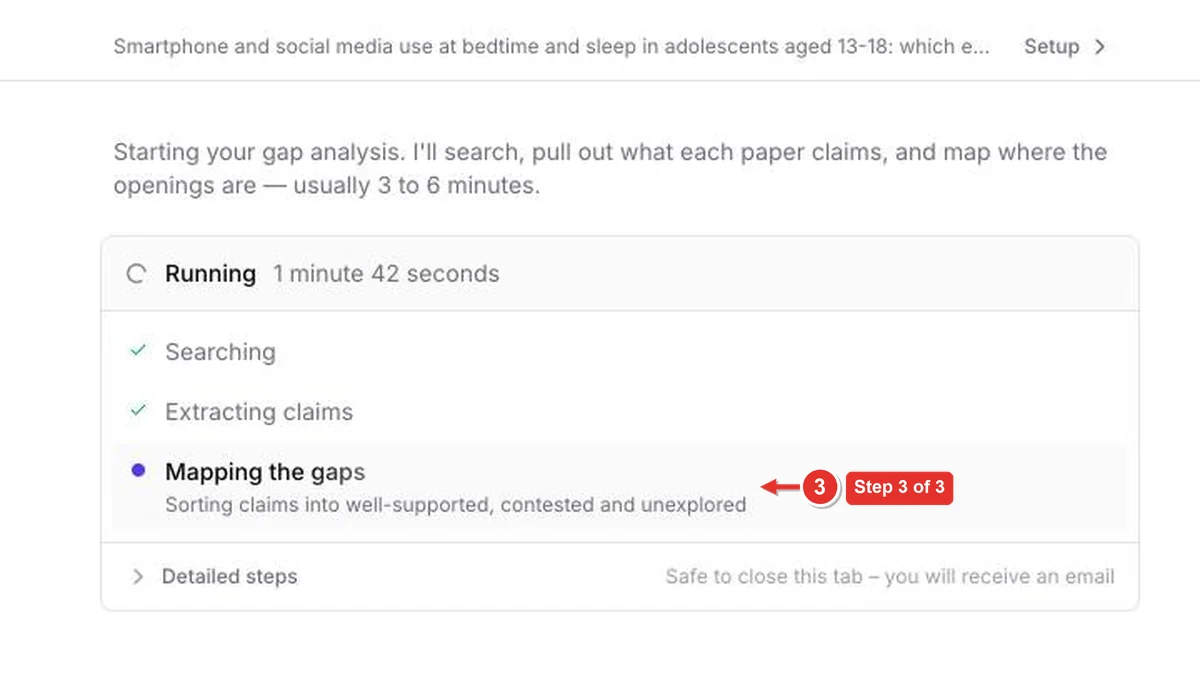
Ours finished in 1 minute 53 seconds with 45 sources.
The report (2,905 words) has sections for under-explored, contested and well-supported claims, plus directions and the limits of its search. One under-explored claim it flagged: parental device rules are linked to better sleep only in correlational studies.
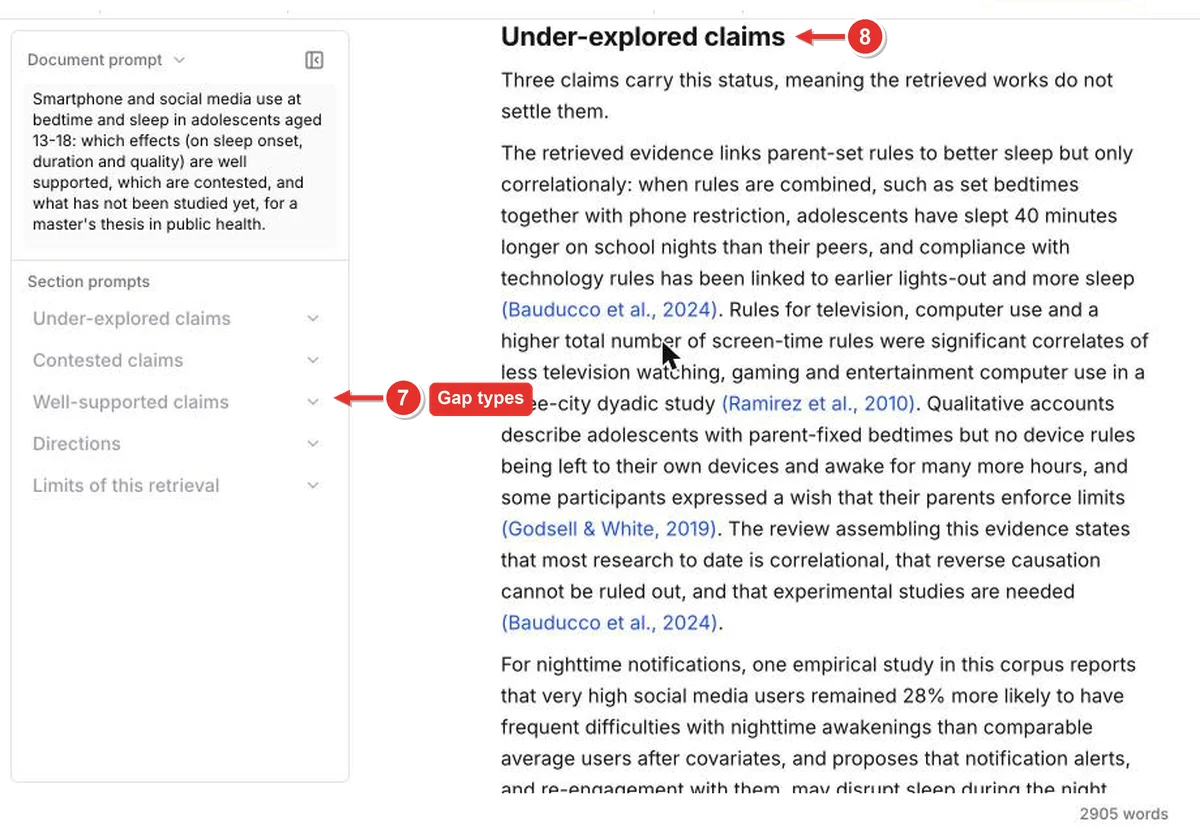
Use it to write your Research Gap section, but check each claim against the papers before you rely on it.
Chapters 3–6: what to use Jenni for
| Chapter | Use Jenni for | Do yourself |
|---|---|---|
| 3. Methodology | Justifying your design with citations to methods literature | Your actual sample, instruments and procedure |
| 4. Results | Turning your tables into clear prose with AI Edit | Every number and statistic |
| 5. Discussion | Comparing findings with the literature; Claim confidence and Peer review checks | Your interpretation and contribution |
| 6. Conclusion | Proofreading only | Answers to your research questions |
Work with your supervisor
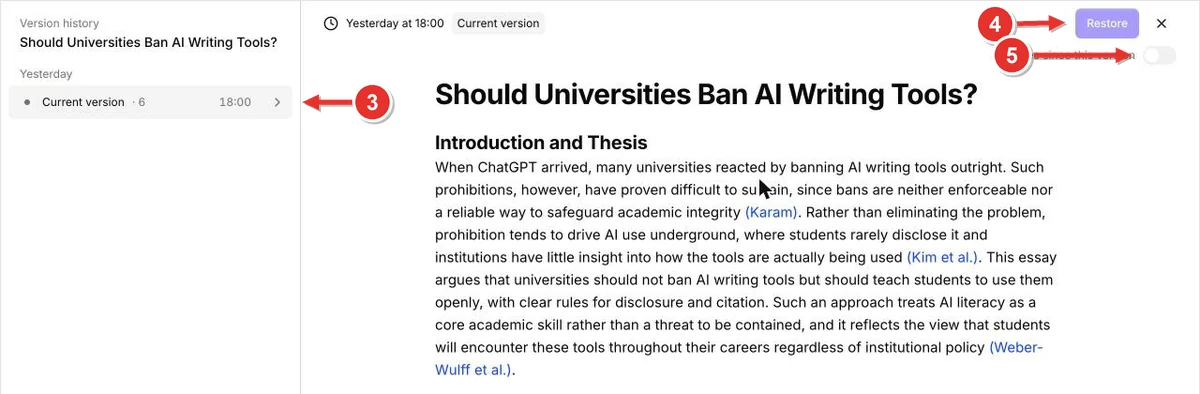
Open the ⋯ menu for Comments and Version history.

Version history keeps saved versions of the chapter. Turn on Changes since this version to see edits, or Restore an older draft.
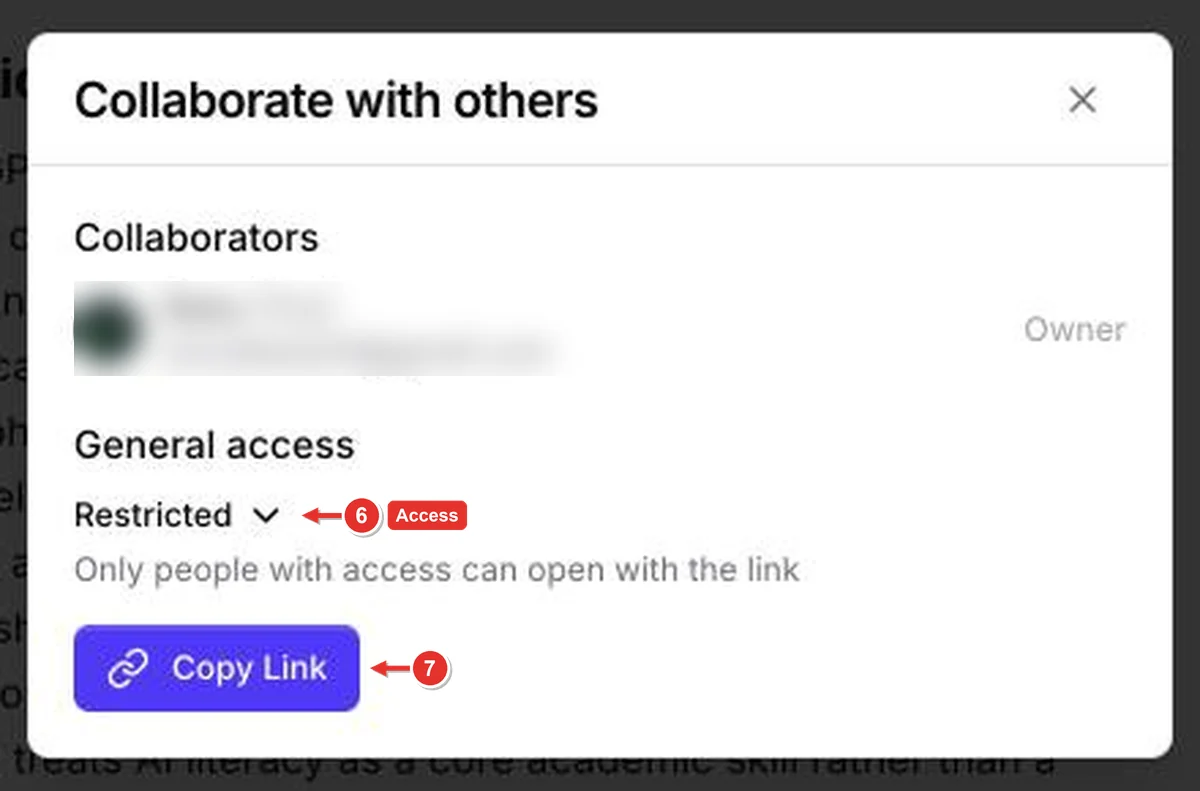
Click Share to give your supervisor access. Keep access Restricted and invite them, or use Copy Link.
Before submission, run Review → Peer review and Claim confidence. Jenni’s thesis page also mentions a built-in AI usage statement you can add to your methods or acknowledgements.
Free thesis chapter template (.docx)
Our Word template lists every thesis chapter with its sections, typical share of the word count, a ready-made Jenni prompt and a tip for each chapter.
Free plan and thesis limits
- Free plan: 10 autocompletes a day, 5 AI requests, 3 reviews and 3 workflow runs. Enough to set up and test, not to write a whole thesis.
- Reference list: a paid feature, and a thesis needs one.
- Long PDFs: free uploads are limited to 150 pages; Plus allows 500 and Pro 1,000.
- Our advice: try the free plan on one chapter, then compare plans in our pricing guide.
What didn’t work
Honest notes from our test
- Generate wrote the aim, not the questions. Under the Research Questions heading, Generate drafted an aim sentence. We wrote the questions ourselves.
- Gap analysis needs checking. It’s a strong map, but some “under-explored” claims may simply be missing from its 45 sources.
- Limits arrive fast. One gap analysis used 1 of our 3 free workflow runs.
What we found when we tested it
- 10 of 10 citations pointed to real papers (8 fully correct)
- A 2,592-word literature review with 49 sources in 1 min 50 s
- In our essay test, Jenni wrote 76% of the words while we steered
Honest limit: 2 of 5 essay citations were loose matches for their sentence. Always open the source before you keep it.
Start Jenni free in 3 steps
- Sign up with Google or email.
- Describe your paper in the prompt box: topic, length and citation style.
- Press → to accept a suggestion, or keep typing to skip it.
No card needed. Upgrade only if you hit the free limits.
FAQ
How do I use Jenni AI for thesis writing?
Create one document per chapter, write a detailed chapter prompt, filter sources, let Jenni build the outline, then write with autocomplete and Generate. Use workflows for the literature review and research gaps.
Can Jenni AI write my whole thesis?
No, and it shouldn’t. Use it to draft and cite chapter by chapter, but write your research questions, analysis and conclusions yourself.
Is Jenni AI good for a dissertation?
Yes for structure, drafting and citations. Its research gap analysis and Version history are especially useful for long projects.
Can I import my existing thesis draft?
Yes. Use Import from Word (.docx) when creating a document.
Can my supervisor see my Jenni document?
Yes, if you share it. Click Share and invite them or copy a link.
Is Jenni AI free for thesis writing?
You can test it free, but a full thesis needs more autocompletes and AI requests than the free plan gives, and the reference list is paid.
Is it allowed to use Jenni AI for a thesis?
It depends on your university. Many allow AI help with disclosure. Check your rules and declare how you used it.
Leave a Reply