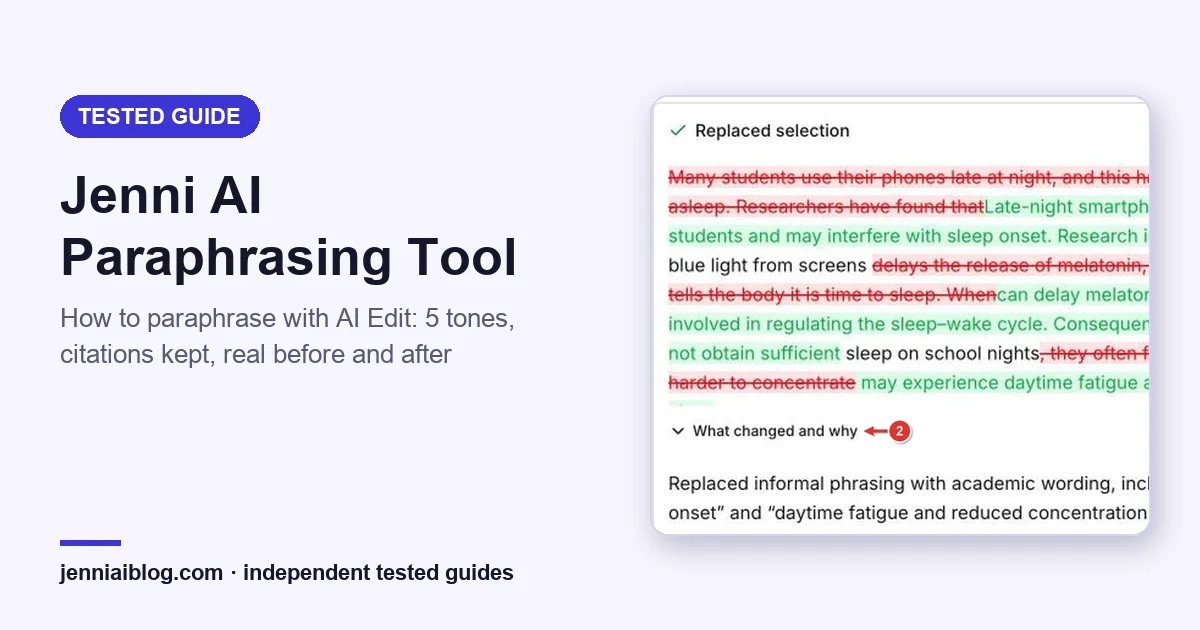
Quick answer: does Jenni AI have a paraphrasing tool?
Yes, but it lives inside the editor as AI Edit. Select your text, click AI Edit, then Paraphrase and pick a tone. On the free plan each paraphrase uses 1 of your 5 AI requests. In our tests Jenni kept every in-text citation, but one rewrite changed what a sentence said.
Paraphrase inside the same document you write and cite in. The free plan needs no card.
Is Jenni AI right for you?
✓ Great for
- Essays and research papers that need real citations
- Literature reviews and thesis chapters
- Writing from your own PDFs and sources
- Staying in control, one sentence at a time
✗ Not the right tool for
- Getting a finished essay in one click
- Grammar-only checking (a grammar tool is cheaper)
- Anyone who won’t check the sources it adds
We tested Jenni’s paraphrasing on a free account on November 24, 2026. Below are the exact steps, real before-and-after text, and what each run cost.
In this guide
- What is the Jenni AI paraphrasing tool?
- How to paraphrase in Jenni (5 steps)
- Before and after: our test
- The 5 paraphrase tones
- Paraphrase vs Simplify
- Write your own paraphrase prompt
- Does it keep citations?
- How many paraphrases are free?
- Is paraphrasing with Jenni plagiarism?
- FAQ
What is the Jenni AI paraphrasing tool?
Jenni has a page called “AI Paraphrasing Tool” at jenni.ai/paraphrasing-tool. It has no text box of its own; it sends you into the Jenni editor.
Inside the editor, paraphrasing is one option in AI Edit. You use it on any text you select in your document.
AI Edit offers more than paraphrasing. These are the options we saw in the menu:
| Group | Options |
|---|---|
| Strengthen writing | Improve fluency, Paraphrase, Simplify, Strengthen argument, Add a counter argument |
| Transform | Change tense, Convert to bullet list, numbered list, prose or table, Translate |
| Style | Academic style, Increase formality, Technical precision, Increase or hedge claim confidence |
How to paraphrase in Jenni AI (5 steps)
Step 1: Select the text
Highlight a sentence or paragraph in your document. A small menu appears under it.
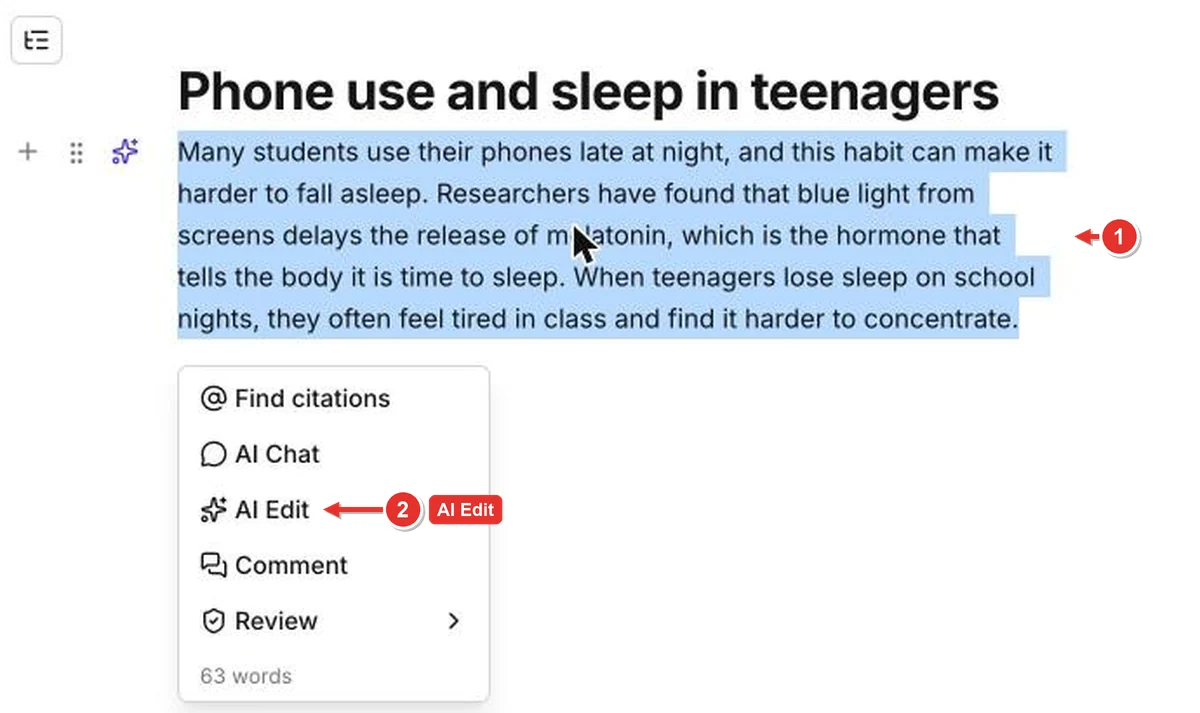
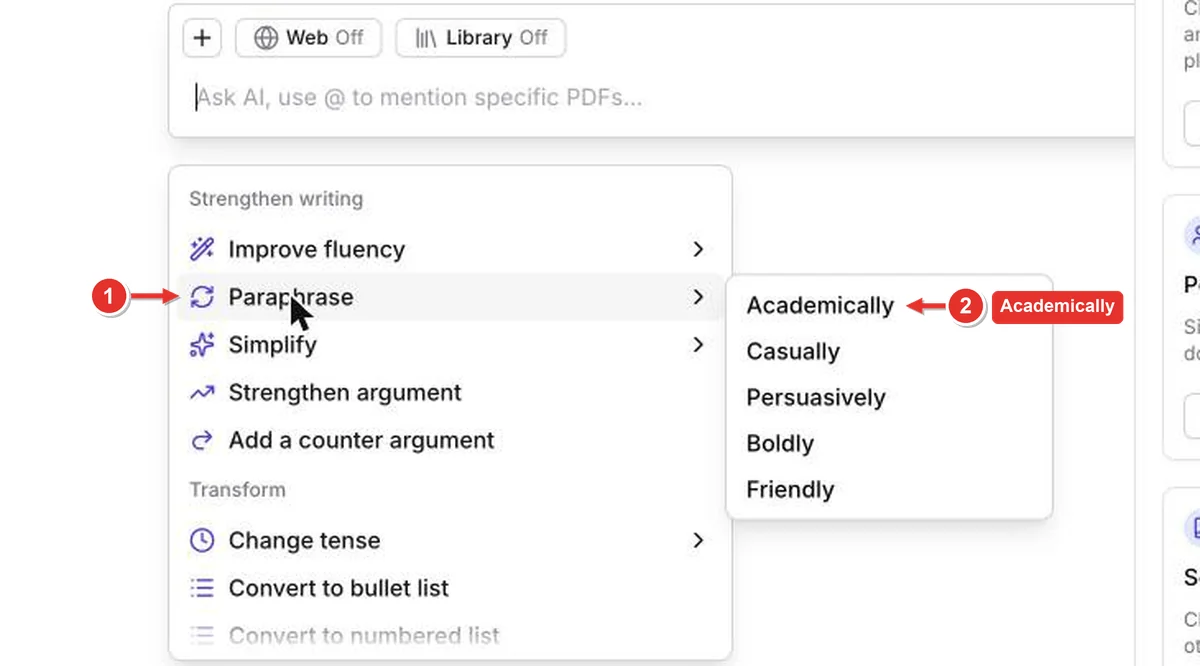
Step 2: Click AI Edit, then Paraphrase
Hover over Paraphrase to see the tones. Pick one; we used Academically for a school essay.
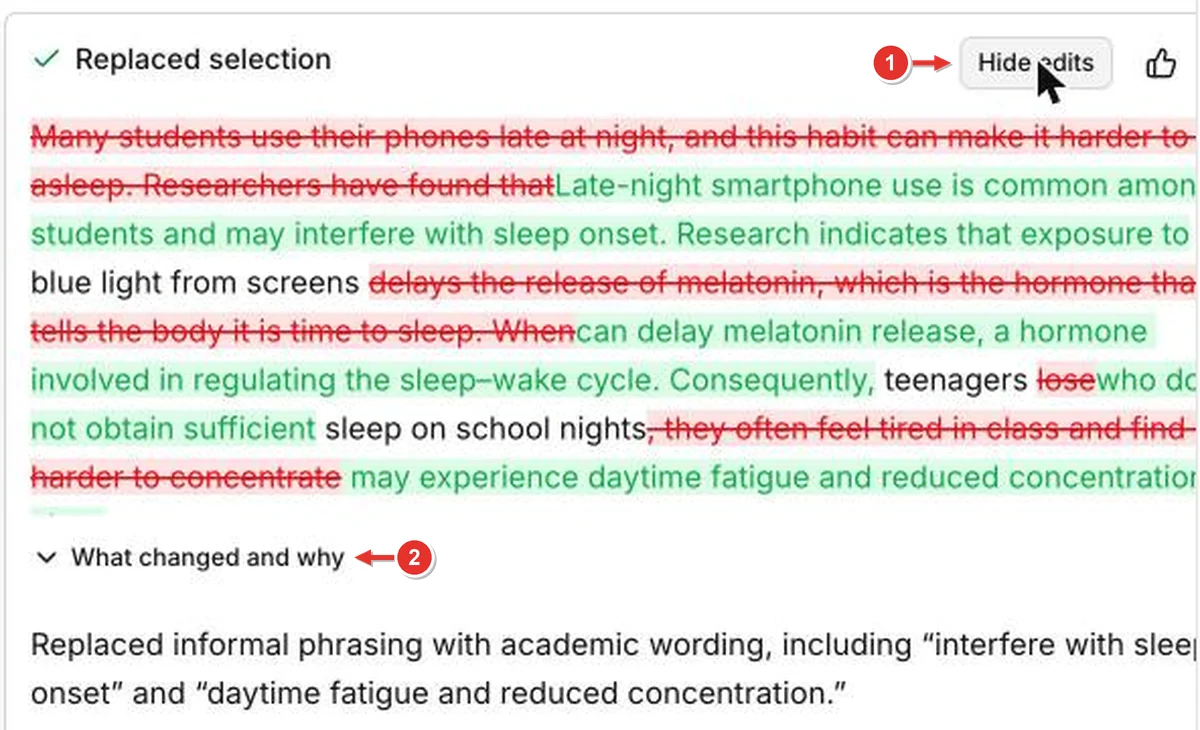
Step 3: Check the edits
Jenni replaces your text straight away and shows Replaced selection. Click See edits to compare.
Removed words show in red and new words in green. What changed and why gives a one-line explanation.
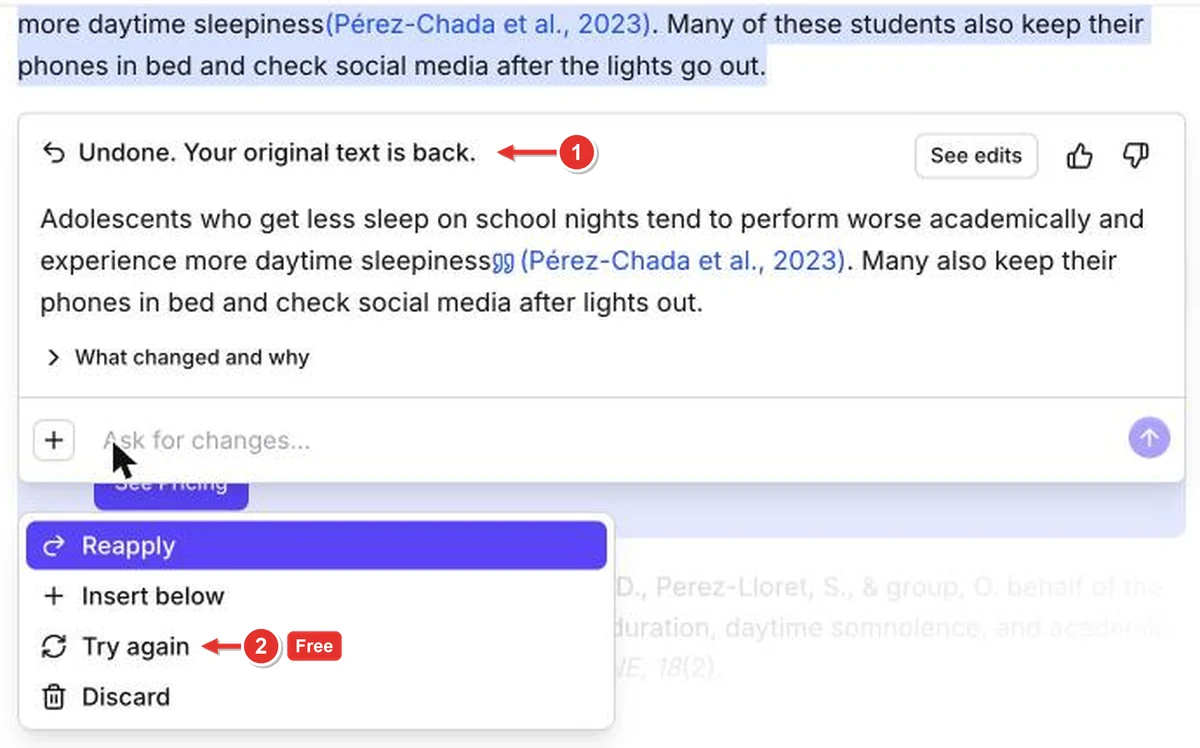
Step 4: Keep it, undo it or try again
Click Done to keep the new text, or Undo to bring your original back.
After Undo, you can Reapply, Insert the new version below your text, Try again for a different version, or Discard it.
Step 5: Read it once more
Read the new version against your source. Paraphrasing can shift meaning, as our test below shows.
What you get free
Jenni AI’s free plan, checked on jenni.ai/pricing in November 2026:
- 10 autocompletes a day (resets daily)
- 5 AI requests, shared by AI Chat, AI Edit and Ask Jenni
- 10 PDF uploads to write from your own sources
- 3 reviews and 3 workflow runs
- Unlimited in-text citations (the reference list is a paid feature)
No card needed · free forever. If you outgrow it, Plus is $12/mo billed yearly.
Before and after: our test
We wrote a short, plain paragraph and asked Jenni to paraphrase it Academically.
Before (69 words):
Many students use their phones late at night, and this habit can make it harder to fall asleep. Researchers have found that blue light from screens delays the release of melatonin, which is the hormone that tells the body it is time to sleep. When teenagers lose sleep on school nights, they often feel tired in class and find it harder to concentrate.
After (60 words):
Late-night smartphone use is common among students and may interfere with sleep onset. Research indicates that exposure to blue light from screens can delay melatonin release, a hormone involved in regulating the sleep–wake cycle. Consequently, teenagers who do not obtain sufficient sleep on school nights may experience daytime fatigue and reduced concentration in class.
The meaning stayed the same and the tone became academic. Jenni also softened claims with “may” and “can”, which suits academic writing.
The 5 paraphrase tones
| Tone | Use it for |
|---|---|
| Academically | Essays, papers and theses |
| Casually | Blog posts, discussion boards, notes |
| Persuasively | Argument essays, cover letters, proposals |
| Boldly | Strong, direct claims and conclusions |
| Friendly | Emails and messages |
We tested Academically. The other tones use the same steps and cost the same: one AI request each.
Paraphrase vs Simplify
Paraphrase rewrites in new words at about the same level. Simplify makes the text shorter and easier to read.
Simplify has the same five tones. We used Simplify, Academically on a cited paragraph.
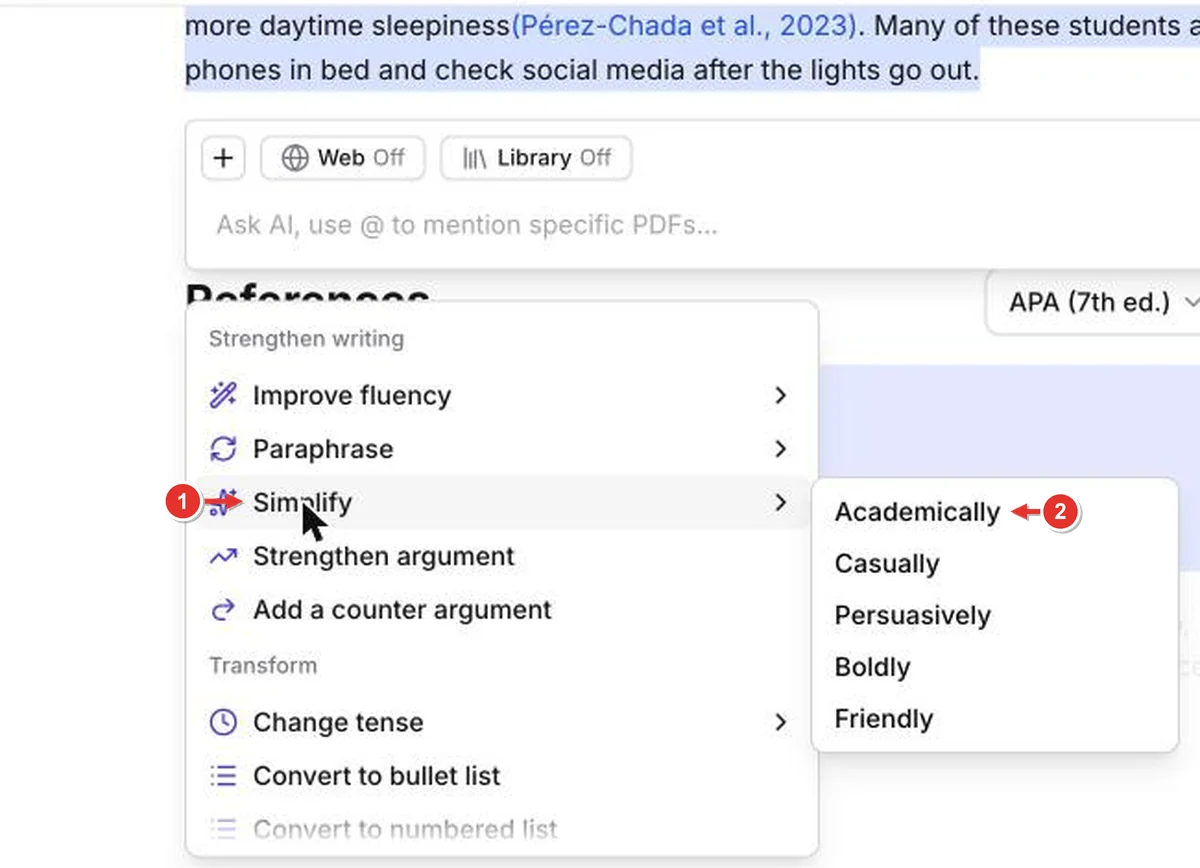
It cut 42 words to 38 and kept the citation in place: “Adolescents who get less sleep on school nights tend to perform worse academically and experience more daytime sleepiness (Pérez-Chada et al., 2023).”
Write your own paraphrase prompt
You don’t have to use the presets. After you click AI Edit, type an instruction in the Ask AI box and press Enter.
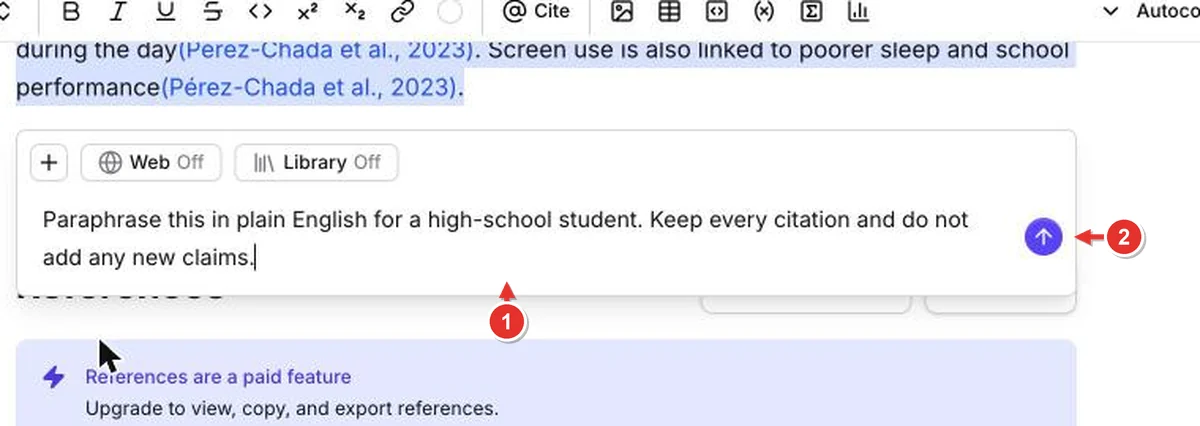
Our prompt: “Paraphrase this in plain English for a high-school student. Keep every citation and do not add any new claims.”
More prompt ideas to copy (we tested the first one):
- Paraphrase this in plain English. Keep every citation and do not add new claims.
- Paraphrase this in my own voice, keeping each sentence’s meaning.
- Paraphrase this in under 40 words for an abstract.
- Paraphrase this so it doesn’t repeat the words in the sentence before it.
Does Jenni keep citations when it paraphrases?
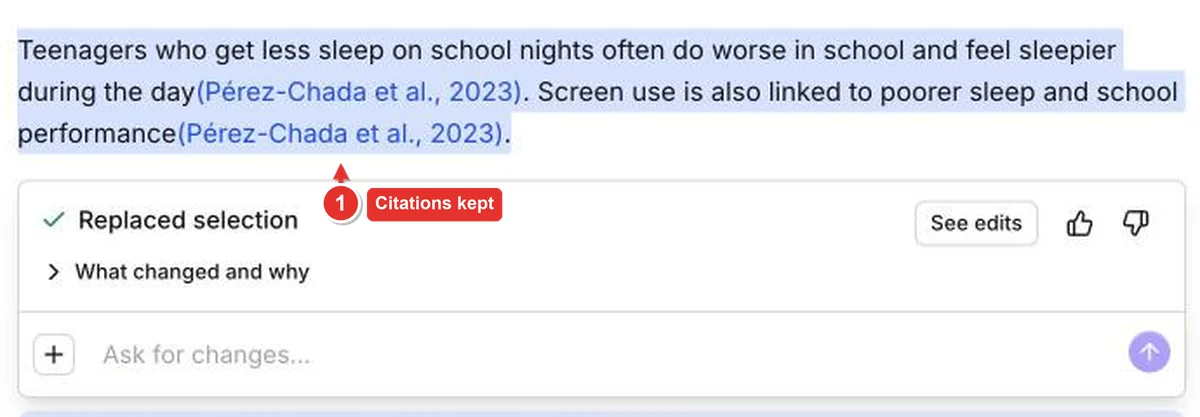
In all three runs on cited text, every in-text citation stayed and still linked to the paper. That is a real plus over copy-and-paste paraphrasers.
But one run changed the point. On Try again, Jenni swapped our sentence “Many of these students also keep their phones in bed” for “Screen use is also associated with poorer sleep and academic outcomes” and added the citation to it.
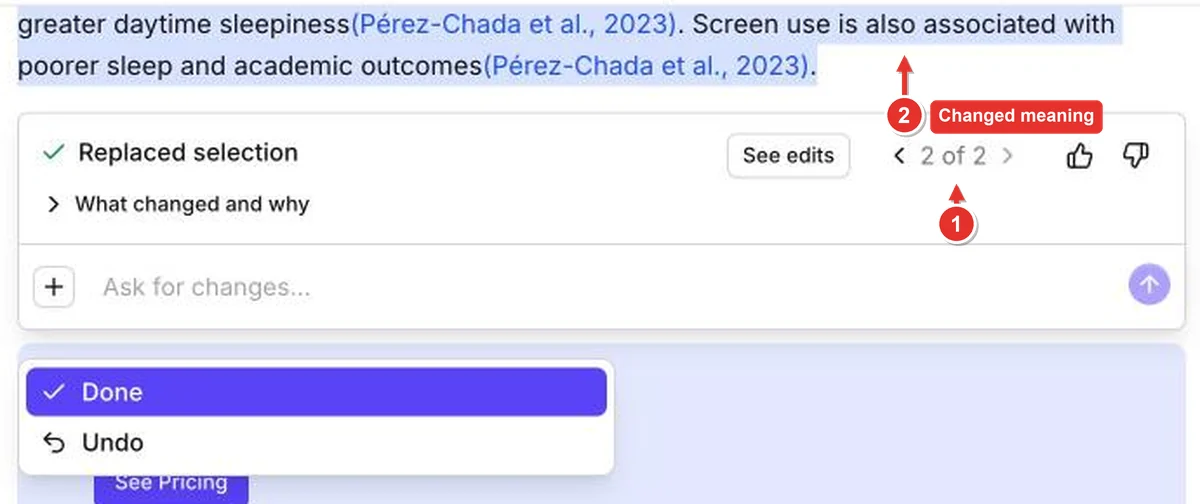
The new claim happens to match the cited paper, but it was not what we wrote. Always use See edits, and check any sentence that gained a citation.
How many paraphrases are free?
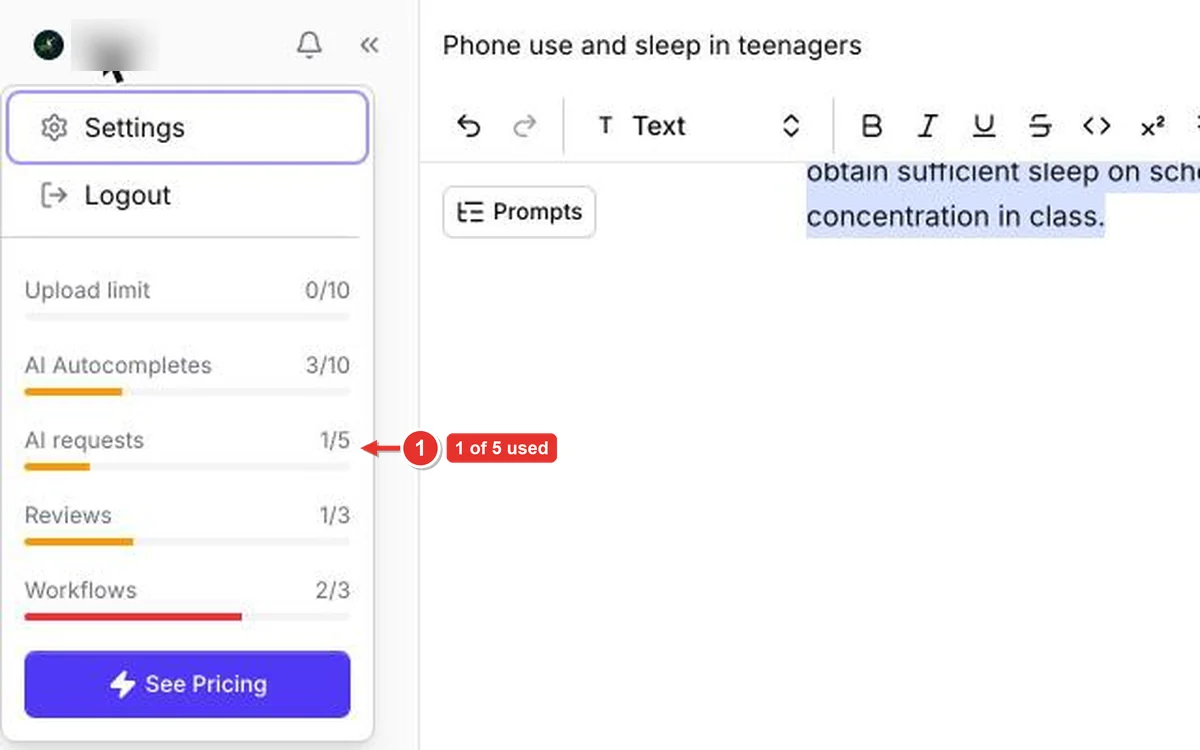
Every AI Edit, including paraphrase, uses an AI request. The free plan has 5 in total, shared with AI Chat and Ask Jenni.
| Plan | AI requests | Price |
|---|---|---|
| Free | 5 | $0 |
| Plus | 500 a month | $12/mo billed yearly ($30 monthly) |
| Pro | Unlimited | $29/mo billed yearly ($73 monthly) |
- Try again was free in our test: four runs used only 3 requests.
- Undo is free, so you can test a tone and go back.
- Tip: select a whole paragraph instead of single sentences, so one request covers more text.
Need more? See the Free vs Plus vs Pro comparison, or ways to pay less for Jenni AI.
Is paraphrasing with Jenni plagiarism?
Paraphrasing your own draft is normal editing. Paraphrasing someone else’s text still needs a citation, even when every word is new.
Don’t use any paraphraser to hide where an idea came from. Keep the citation, and follow your school’s rules on AI tools.
AI detectors may still flag AI-rewritten text. Read the result, change it into your own voice, and add your own analysis.
What we found when we tested it
- 10 of 10 citations pointed to real papers (8 fully correct)
- A 2,592-word literature review with 49 sources in 1 min 50 s
- In our essay test, Jenni wrote 76% of the words while we steered
Honest limit: 2 of 5 essay citations were loose matches for their sentence. Always open the source before you keep it.
Start Jenni free in 3 steps
- Sign up with Google or email.
- Describe your paper in the prompt box: topic, length and citation style.
- Press → to accept a suggestion, or keep typing to skip it.
No card needed. Upgrade only if you hit the free limits.
FAQ
Is the Jenni AI paraphrasing tool free?
Yes, on the free plan, but each paraphrase uses 1 of your 5 AI requests. Plus gives 500 a month and Pro is unlimited.
Is there a standalone Jenni paraphraser?
No. jenni.ai/paraphrasing-tool is an information page that leads into the Jenni editor, where you paraphrase with AI Edit.
Does Jenni AI keep my citations when paraphrasing?
In our tests, yes: every in-text citation stayed and still linked to its paper. Check the sentences, though, because one rewrite changed a claim.
Can I undo a Jenni paraphrase?
Yes. Click Undo right after the edit and your original text comes back. You can then Reapply, Insert below, Try again or Discard.
What paraphrase tones does Jenni AI have?
Academically, Casually, Persuasively, Boldly and Friendly. Simplify has the same five tones.
Can Jenni AI paraphrase into another language?
AI Edit has a Translate option. Jenni’s help center says it supports 35+ languages; we didn’t test it here.
Leave a Reply